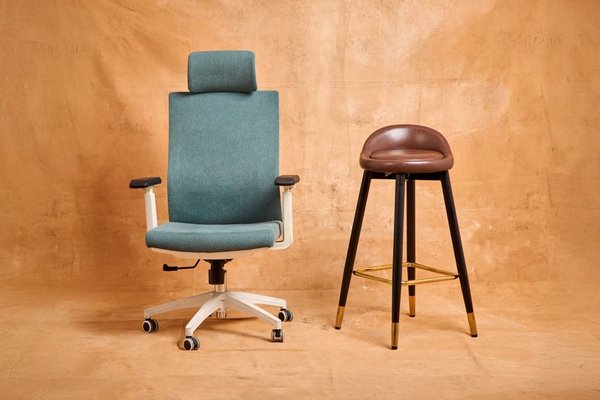
A home office chair can feel comfortable during a ten-minute showroom test and become frustrating by mid-afternoon. Long working days expose problems that brief sitting does not: a seat that presses behind your knees, armrests that block the desk, or a backrest that never quite supports your lower back. When choosing a home office chair for long hours, look beyond plush padding. The better purchase is the chair you can adjust to your body, your desk and the way you work.
Check the chair against your workstation first
Before comparing models, measure your desk height and consider where your keyboard sits. With shoulders relaxed and elbows near your sides, your forearms should reach the keyboard without bending your wrists upward. Your feet should rest on the floor or a stable footrest. If the desk is high, raising the chair may help your arms but leave your feet dangling; a footrest can resolve that mismatch.
Check the space beneath the desk. Wide fixed armrests can stop a supportive desk chair from rolling close enough, forcing you to lean forward. A chair that fits your work surface is more useful than one with controls you cannot use. Your home office desk height guide can help assess the complete setup.
The adjustments that matter over a full workday
Seat height and depth
Seat height should let you sit back fully with supported feet. Seat depth matters just as much: your thighs need support without the front edge pressing into the backs of your knees. A small gap behind the knees is a practical check, not a universal measurement. A sliding seat pan is especially valuable if standard chairs feel too short or deep.
Lumbar support that meets your back
Good lower-back support follows your spine’s natural curve rather than pushing aggressively into one spot. Look for a backrest or lumbar feature that adjusts vertically, ideally in depth too. Test it while sitting normally, not deliberately arching your back. Support that feels intrusive within minutes may become unpleasant during a long session.
Recline and movement
A chair for all day sitting should support more than one rigid position. Controlled recline or synchronized tilt lets you lean back during reading or calls, then return to typing. Adjustable tilt tension keeps the chair from resisting every movement or dropping backward too easily. Comfortable variation matters more than maintaining one supposedly perfect posture.
Armrests that get out of the way
Armrests can support your forearms, but only when they allow relaxed shoulders and elbows near your body. Height adjustment is useful; width adjustment matters for different body frames. Check whether the arms slide beneath your desk. If they collide with the worktop, they may undermine an otherwise comfortable office chair.
What makes a seat comfortable after several hours?
Softness alone poorly predicts lasting comfort. A very cushioned seat can bottom out, while firm, resilient padding may distribute pressure more consistently. Look for enough width to change position and a rounded front edge that does not dig into your legs. Labels such as “ergonomic” or “executive” do not guarantee a good fit.
Notice how the seat and back move together. If you slide forward when reclining, you may lose lumbar contact. Good office seating lets you settle into several positions without constantly fighting the adjustment controls.
Mesh, fabric or cushioned upholstery?
Materials affect long sessions, but there is no universal winner. Mesh backs can improve airflow in warm rooms, provided the tension and frame do not create pressure points. Fabric-covered foam may feel softer initially, although breathability and cushion resilience vary. Fully mesh seats suit some people and feel too taut to others.
Consider room temperature, clothing and whether you get warm while working. Inspect stitching, frame edges and cushion recovery rather than assuming a material guarantees comfort. A home office chair materials guide can help narrow your shortlist.
Use a realistic test before buying
Imagine spending the morning typing, an hour reviewing documents and the afternoon on video calls. Those tasks involve different positions. Reproduce that routine in miniature instead of sitting motionless for thirty seconds.
Adjust seat height and depth, then back support and armrests. Type for several minutes with the chair at a desk. Lean back as if taking a call. Sit upright again: are your feet supported, shoulders relaxed and knees clear of the seat edge? Roll in and out of the desk to check whether the chair swivels smoothly without hitting furniture.
Online shoppers should compare adjustment ranges instead of relying on photographs. Check minimum seat height, usable width, depth adjustment and armrest dimensions against your body and workspace. Read return conditions carefully; a home trial helps only if an uncomfortable chair can be returned without prohibitive fees.
Spend on fit, construction and serviceability
A higher price does not automatically deliver better comfort. Prioritize adjustments you will use, followed by a stable base, suitable casters, reliable controls and clear warranty coverage. Confirm that the stated weight capacity is appropriate and whether replacement casters or arm pads are available.
Casters designed for carpet may behave differently on hard floors. A floor mat may help protect your surface. A well-fitting midrange chair can outperform a feature-heavy model with limited adjustment. Compare your options against a wider home office chair buying guide before deciding.
Even a good chair is not a substitute for moving
Supportive seating may reduce awkward positions, but it cannot make uninterrupted sitting ideal. Change posture, stand for brief tasks and take periodic walking or stretch breaks. Position your screen and keyboard to avoid twisting or reaching. The chair should make those transitions easy instead of locking you into one position.
Frequently asked questions
What is the most important feature in a chair for long hours?
Fit and adjustability matter more than any single feature. Start with seat height, depth and lower-back support, then confirm the armrests and recline work with your desk.
Is a mesh chair better than a padded chair for long workdays?
Not necessarily. Mesh may feel cooler, while padding offers a different sitting sensation. Test both and judge pressure, support and comfort over time.
Do I need a headrest for computer work?
Many people work comfortably without one. A headrest may help during deeper recline, but it should not push your head forward when typing upright.
Can a chair prevent back pain completely?
No chair guarantees that. Appropriate fit, workstation arrangement and frequent movement can help reduce strain. Persistent or worsening pain warrants advice from a qualified healthcare professional.
Choose the chair you can live with
The best home office chair for long hours is not necessarily the softest or most expensive. It supports your feet, shoulders, legs and back while permitting movement. Check those qualities against your desk, test realistic working positions and consider returns before committing. That gives you a better chance of finding comfort that lasts beyond the first hour.