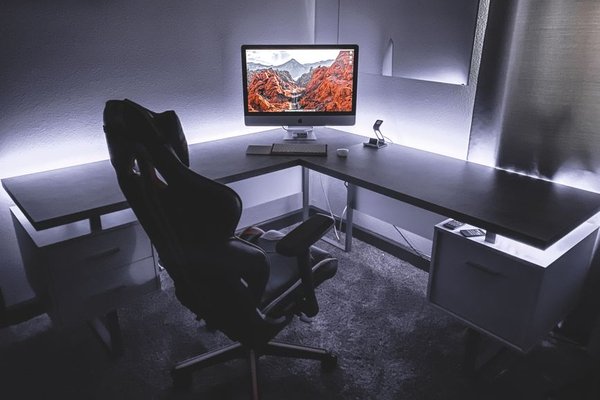
A home office desk with storage can make a cramped workday feel calmer, but more drawers do not automatically mean a better workspace. A cabinet that crowds your knees or a hutch that pushes your monitor forward can create problems you notice every day. The right desk keeps supplies close while leaving room to type, move your chair, and spread out paperwork. Before choosing a design, think about what needs storing, how often you reach for it, and what must remain clear.
Start With Your Actual Storage Habits
Group your supplies by frequency of use. Keep daily items, such as a notebook, charger, and pens, within easy reach. Weekly supplies can live in a drawer or shelf. Spare paper and archived files may belong elsewhere.
This inventory prevents a common mistake: paying for bulky storage that accommodates things you barely use. A compact desk with drawers may serve a laptop-based worker better than a large workstation with cabinets on both sides. If you need reference books constantly, vertical storage may earn its space.
Compare the Main Types of Storage
Drawers: Small Supplies and Visual Calm
A desk with drawers hides stationery, cables, and paperwork. Shallow drawers suit everyday items, while a deep file drawer is useful if its dimensions fit your folders. Check whether drawers extend far enough, whether slides run smoothly, and whether handles catch your chair.
Placement matters more than drawer count. A centered pencil drawer can reduce thigh clearance. A side pedestal usually leaves a more open seated position, provided it does not narrow the leg space too much.
Shelves: Books and Accessible Equipment
A desk with shelves offers quick access to notebooks, reference materials, and a printer. Open shelving makes items visible but needs occasional dusting. Check usable shelf height and depth rather than assuming a printer or basket will fit. Lower shelves suit less-used supplies, but should not block your feet.
Hutches: Storage Above the Desktop
An office desk hutch uses vertical space for compartments and books, useful when another floor-standing cabinet will not fit. However, its panels can limit monitor and lamp placement. Check the open width and height beneath the hutch, especially with a large screen or monitor arm. Verify that tall furniture can be secured according to its manufacturer’s instructions.
Cabinets: Bulky or Private Items
A storage desk with a cabinet can conceal spare equipment, files, or a paper shredder. Doors reduce visual clutter, but their swing needs clearance. In narrow rooms, sliding doors or drawers may work better. For sensitive papers, seek a genuinely lockable compartment rather than relying on a closed door.
Protect Work Surface and Legroom First
Measure the wall where your desk will sit, along with outlets, door swings, and walking routes. Then measure your chair, including armrest height and how far it rolls backward. Product listings advertise overall desk width, but the open space between storage units matters just as much.
For computer work, leave room for the keyboard and mouse directly in front of you. OSHA workstation guidance recommends positioning a monitor at least 20 inches from your eyes and leaving adequate space beneath the desk for comfortable leg movement. A desk that looks generous in photographs may feel shallow once a monitor and hutch are installed.
Check underside height, crossbars, and pull-out trays. Your shoulders should remain relaxed, with elbows near your body and wrists reasonably straight when typing. Desk height, chair adjustment, and storage placement must work together; a crowded knee area can prevent you from sitting close enough to your keyboard.
Try a Realistic Workday Layout
Imagine a 48-inch-wide desk holding a laptop, separate monitor, notebook, and small printer. Two deep central drawers could leave your knees cramped. A single side pedestal for chargers and stationery, with printer paper on an upper shelf, would preserve more open space. If you print only twice a week, placing the printer on a nearby shelf may be better still.
Use the product dimensions to mark the proposed layout with tape on a table or floor. Include the footprint of the monitor base, not just the screen width. This simple test reveals whether extra compartments improve your setup or merely make it look organized in a photograph.
Check Construction, Cables, and Total Cost
Storage adds hinges, runners, joints, and weight. Look for a stable frame, appropriate shelf weight limits, and hardware designed for repeated use. Solid wood, plywood, metal, and engineered wood can all work well; specific construction quality matters more than the material label alone.
Think about where charging cables will travel. Rear openings or cable channels help prevent wires from being trapped behind cabinetry. Check whether drawers can open while your chair is in position, whether assembly requires extra floor space, and whether replacement parts are available.
Compare the delivered price rather than only the advertised discount. Shipping, assembly, bulky-item returns, and warranty coverage affect value. Reviews discussing wobble, damaged corners, and drawer alignment may be more useful than staged product photos.
Choose a Desk for Your Work Pattern
For a laptop and light paperwork, prioritize an open top and one convenient drawer. For dual monitors, prioritize depth and width before vertical shelving. For paperwork-heavy work, consider a file drawer and temporary sorting space. In a shared room, an enclosed cabinet can hide equipment after working hours.
Planning a complete workstation may also involve small home office layout ideas, desk cable management, and ergonomic office chair selection. Those decisions help ensure the desk works in the room rather than simply fitting against a wall.
Frequently Asked Questions
Is a desk with drawers better than one with shelves?
Drawers conceal small supplies and loose paper. Shelves provide visible access to books and equipment. Both can be useful if they preserve enough legroom and work surface.
Are desks with hutches suitable for computer monitors?
Yes, if the hutch leaves sufficient width, depth, and height for comfortable screen positioning. Check measurements carefully, especially with a large monitor or adjustable arm.
How much storage does a home office desk need?
Enough for the supplies you use regularly, not your entire office inventory. Identify what you reach for daily and weekly, then choose compartments around those items.
Can a small desk still offer useful storage?
Yes. A slim side drawer, upper shelf, or nearby mobile cabinet can organize essentials without crowding the desktop. Always measure the open seating area first.
Make Every Compartment Earn Its Space
The best home office desk with storage supports how you actually work. Start with your equipment and seated position, then select drawers, shelves, a hutch, or cabinets to handle the remaining clutter. When storage has a purpose and the working area remains comfortable, even a modest desk can feel thoughtfully organized.